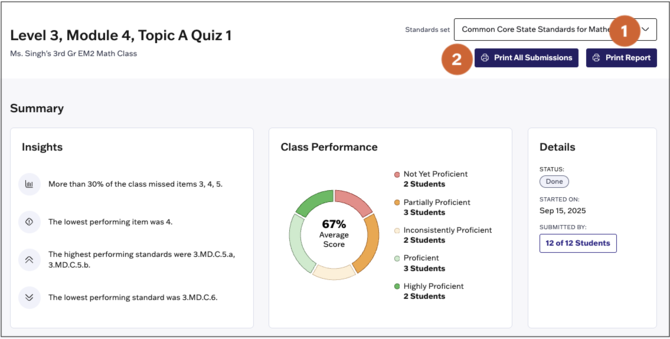
The assessment report contains overall insights into how the class performed on the assessment, how class performance was distributed across proficiency bands, and item analysis.
Access the Report
1. Select Reports from the main menu.
2. Select Assessments from the Reports page.
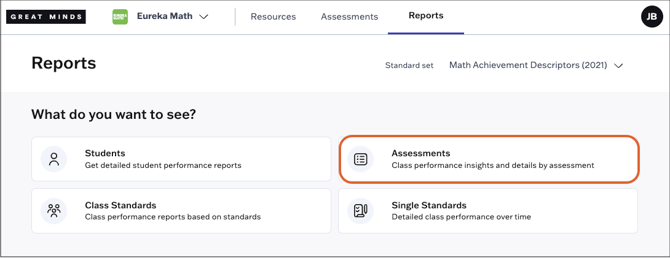
3. Select an assessment from the list. You can filter the list by class or search for a specific assessment using the search bar. Assessments administered to multiple sections will appear once for each section.

Report Sections
The assessment report contains the following sections:
-
Insights into performance trends including commonly missed items, lowest performing items, and/or highest & lowest performing standards
-
Breakdown of class performance across performance bands
-
Item analysis that shows student performance on each item
- Student performance on all assessed standards
From the report, teachers can:
- Hover over any calculation or bar to learn more about the underlying data.
- Click on any item number to preview that item.
- Select a student's name to access that student’s overall performance report.
- Select an item score from the item analysis to view the student's response on that item.
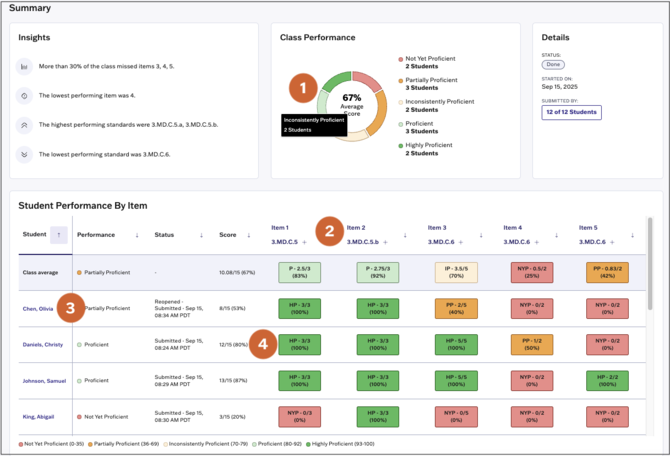
Under Student Performance by Standard, teachers can view student performance on all standards assessed in the assessment. Teachers can click on any standard code to review the full standard description.

Print Report and Submissions
- Print the assessment report by clicking Print Report at the top right of the report.
-
Bulk print student submissions for the selected assessment by selecting Print All Submissions as the top right of the report.