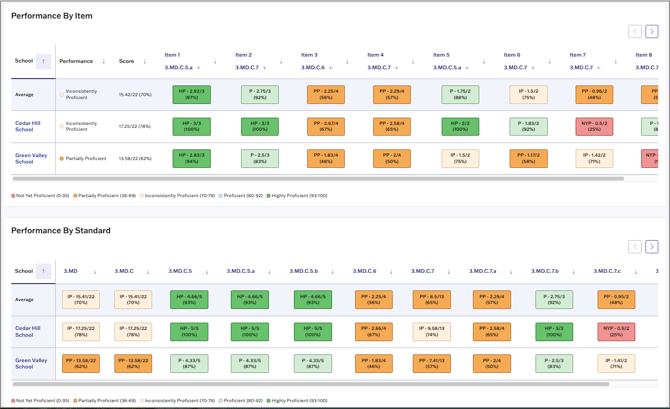
The common assessment report is a visual report for administrators that contains performance data for all assessments administered within a school or district. Administrator reports update nightly (every 24 hours).
⚠️ Visual reports are only accessible within the current school year. Once a school year reaches its end date, visual reports are no longer accessible in the platform. Administrators can access prior year assessment data by exporting CSV reports.
Access the Report
To access the report, navigate to Reports using the main menu. Then select Common Assessment Report from the Reports page.
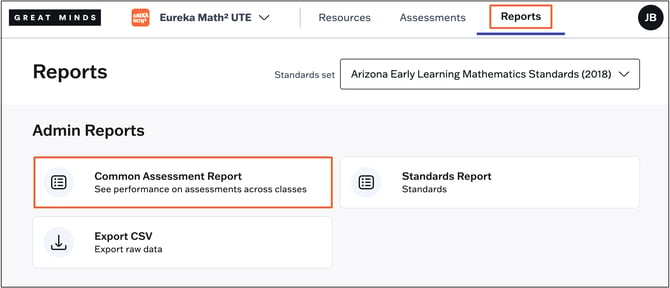
On the next page, you'll see a list of all assessments administered within your school or district. Select an assessment to view the report.

Filter Report Data
- Under View By, you can choose to group by Schools, Teachers, or Classes.
- You can further filter the report to display data for specific Schools, Teachers, Classes, or Proficiency Level(s). Click Apply Filters to apply your selections to the report.

If your organization has multiple standards sets assigned, select your desired standards set using the drop-down at the top right.

Report Sections
Insights
The Insights section provides an at-a-glance summary of the most frequently missed items and highest and lowest performing standards on the selected assessment.

Performance
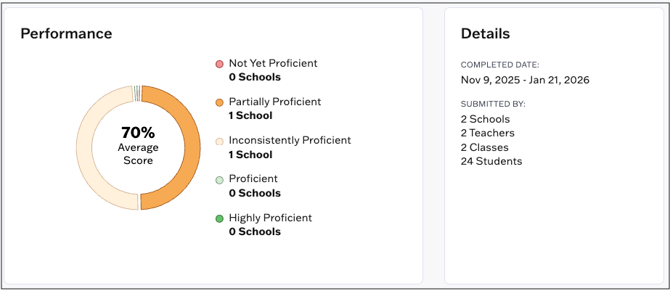
The Summary donut chart at the top of the report shows Schools, Teachers, or Classes (depending on the data distribution selected) grouped by proficiency band. Select a category from the chart to see a list of schools, teachers, or classes in that proficiency level.
Details
The details widget shows the date range when the assessment was administered, as well as counts of schools, teachers, classes, and students.
Student Counts
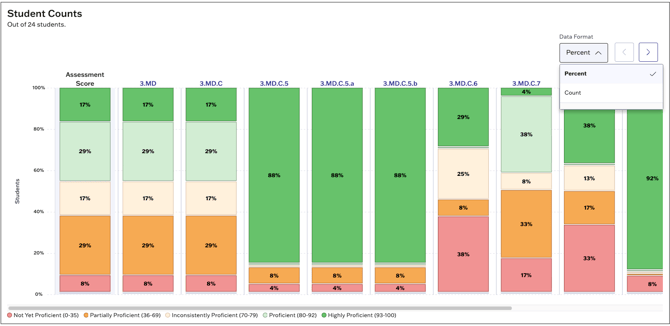
This section shows how many students fall into each performance band for the assessment. Use the toggle at the top right to adjust the data format to show student counts or percentages.
Performance By Item
This section shows a breakdown of performance band, average score and per item average score by School, Teacher, or Class (depending on selected data distribution).
💡Click on any Item Number to see the student view of that item.
💡Click on any standard code to see the correlated item standard.
Standard Performance
In this section, administrators can view:
- A rollup of overall standards performance across your organization for this assessment
- A breakdown of average standards performance by School, Class, or Teacher (depending on the selected data distribution)