
Teachers can print individual student submissions or bulk print submissions for an entire class section. Submission printouts include:
-
Student name
-
Item responses
-
Total score
-
Item scores
-
Teacher feedback
Bulk Print Submissions
1. Select Reports from the main menu.
2. Select Assessments from the Reports page.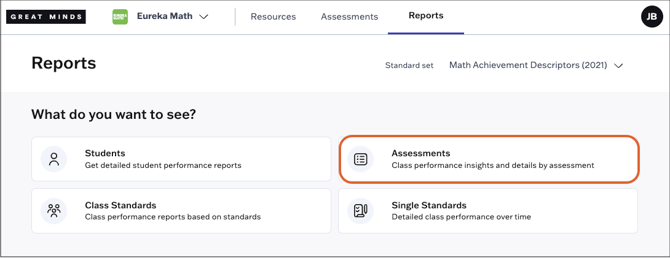
3. Select an assessment from the list. You can filter the list by class or search for a specific assessment using the search bar.
Assessments administered to multiple sections will appear once for each section.

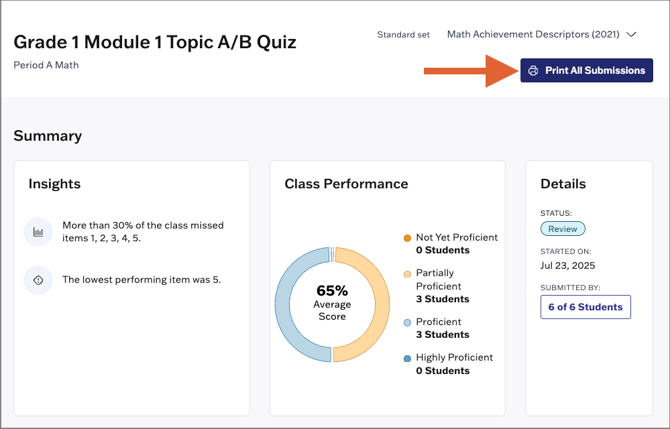
4. At the top right of the assessment report, select Print All Submissions. Ready-to-print submissions will open in a new browser tab.
Print Individual Student Submissions
1. Select Reports from the main menu.
2. Select Students from the Reports page.
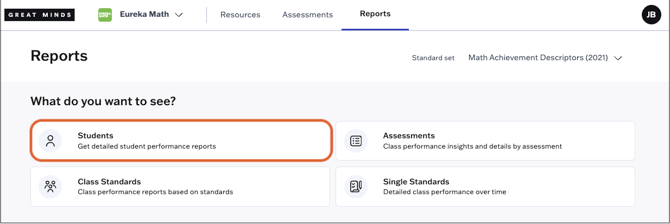
3. Select a student's name to access their report.

4. Locate the assessment submission you wish to print and click View Attempt.

5. If the Print function on your web browser does not launch automatically, you can click the Print button at the top right.