
Administrators can create custom assessments and share them with teachers in their organization. Custom assessments must be published before they can be shared.
Once a custom assessment has been shared, teachers can access the assessment from the My Library tab.
ℹ️ Teachers cannot share assessments at this time.
Share Assessments
1. Select Assessments from the main menu.
2. Select the My Library tab.
3. Locate the assessment you wish to share and click the Share button.
4. In the pop-up window:
- Filter the teacher list by school using the School drop-down
- Select All Teachers to share the assessment with all teachers in your affiliated schools
- Select individual teacher(s) to share the assessment only with the selected teachers.

5. Click the Share button to share the assessment with the selected teacher(s).
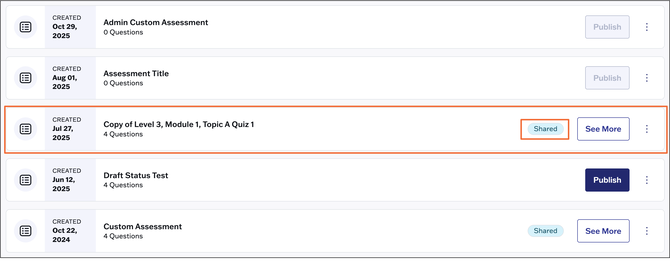
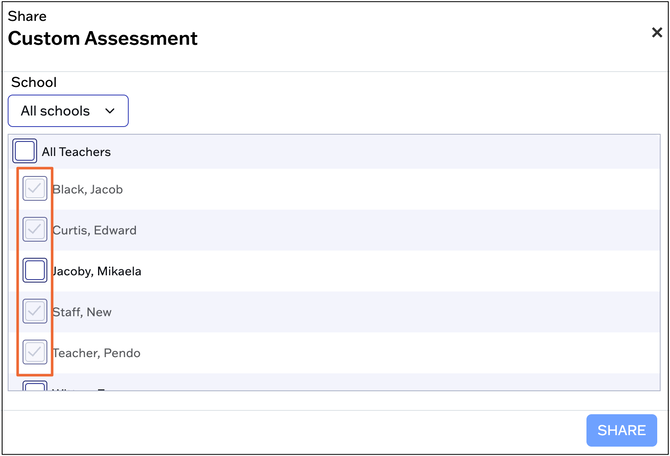
You can revoke access to a shared assessment by deselecting individual teachers or All Teachers. Select the applicable Shared assessment:
Click Share in the upper right:

Use the check boxes to revoke access:
Assessments shared with teachers are denoted by a "Shared" label.

Access Shared Assessments
Teachers will access assessments shared with them by an administrator on the My Library tab. Assessments shared by an administrator are denoted by a "Shared" label.
