
The Single Standards Report allows teachers to drill down to review class performance and individual student performance over time on a single standard.
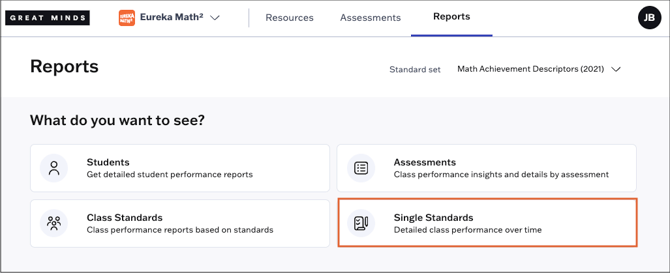
1. Select Reports from the main menu.
2. Select Single Standards from the Reports page.
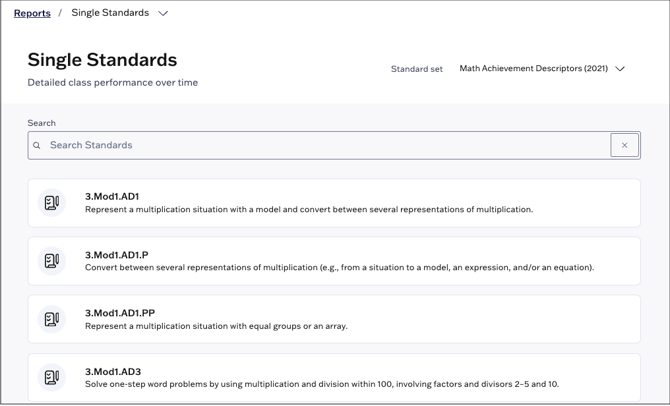
3. Select a standard or achievement descriptor to review the standard's report.
💡Use the search bar at the top of the page to locate a specific standard or achievement descriptor by code or keyword.
💡Use the Standard set drop-down at the top right to switch to a different standard set.
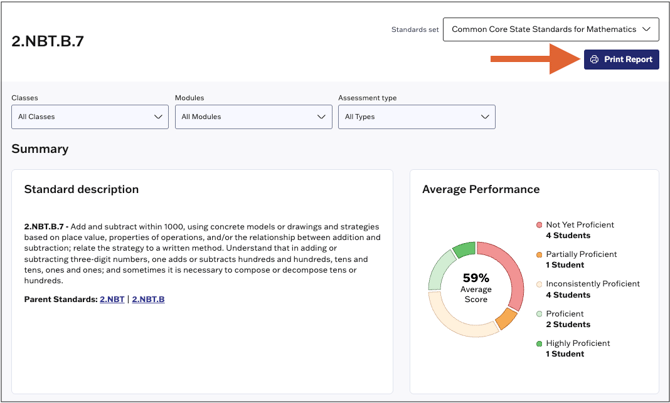
4. If desired, you can filter the report data using the following parameters:
- Class
- Module
- Assessment type

-
Under Standard description, you can review the full description of the selected standard, as well as any parent standards and/or sub-standards.
-
Average Performance shows a distribution of student performance on the selected standard by performance band.
- Use the Print Report option at the top right to print the report.
Under Student Performance by Assessment, teachers can see how students performed on the standard for each assessment that covers that standard to date. This gives an over-time view of how students are performing on standards as they revisit them.
