
This article outlines the embedded accessibility features and additional supports available for Great Minds digital products.
⚠️ Accessibility conformance varies across Great Minds curriculum products.
-
Contact our support team to request an evaluation report or to report any accessibility barriers.
Visual Support
Text-to-Speech
Great Minds has embedded text-to-speech functionality that students can use when taking assessments in the digital platform. Teachers can enable text-to-speech for specific students or entire classes. The text-to-speech tool also provides screen masking functionality. See these articles for more information:
Browser Zoom
In most cases, browser zoom can be used to resize text up to 200% zoom without loss of content or functionality. Exceptions are documented in the evaluation report for each product. Contact support to request an evaluation report.
Assistive Technology
Great Minds uses modern web and digital technology for our digital platform and instructional materials which should support most assistive technology. Exceptions are documented in the evaluation report for each product. Contact support to request an evaluation report.
NIMAS Files
To ensure student access to accessible files, Great Minds has submitted student files to the National Instructional Material Access Center (NIMAC). NIMAC was sanctioned by IDEA 2004 for students with IEPs who need access to alternate forms of printed books. The center creates student-facing materials in the National Instructional Materials Accessibility Standard (NIMAS)* form for students who need accessible formats such as braille, large print, or digital text. Students with dyslexia, blindness, cerebral palsy, and other disabilities that create reading barriers have access to text with these files.
Go to the National Center on Accessible Educational Materials (AEM) site. Each state has its own process for providing qualifying students with access to accessible files. AEM provides general and state-specific information, and the site provides contact information for the NIMAS coordinator for each state. Contact the NIMAS coordinator for your state for more information on acquiring accessible files.
Instructional Recommendations
Students with visual impairments may have limited ability to interact with videos and images. Consider providing preferential seating, enlarged images and videos, printed copies of projected images, auditory descriptions of images, or written descriptions of images to students.
Listening and Hearing Support
Closed Captions
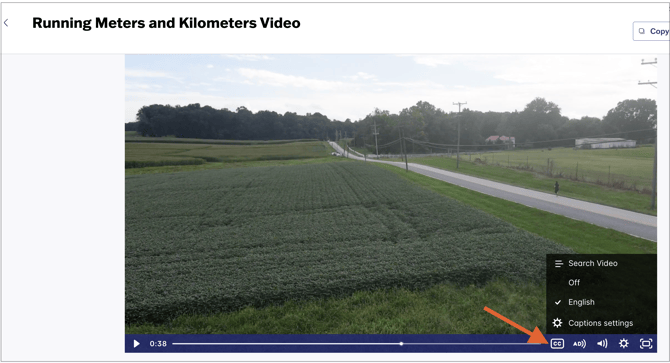
Users can enable closed captions for videos by selecting the CC icon in the player controls. Once selected, choose the applicable language from the menu.
⚠️ Language availability varies across Great Minds curriculum products.
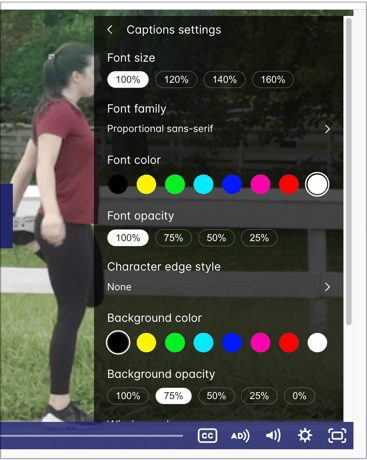
Users can adjust caption size, font, color, and opacity using the Caption settings menu.
Instructional Recommendations
Students and teachers who are deaf or hard of hearing face daily challenges in the English language arts classroom. Teachers with students who are deaf or hard of hearing will want to attend to the student’s social-emotional needs as well as their academic needs. Here are some guidance and tips for supporting students’ specific learning needs:
- Remember to face the student as often as possible, keeping hands away from the face while speaking to allow for lip reading and interpretation of facial expressions.
- Provide written directions and use visual aids for modeling or instruction, when possible.
- Avoid blocking the board, whiteboard, or projector during periods of direct instruction or when providing directions.
- Invite student volunteers to share written notes when appropriate.
- Modify videos or recordings, such as by providing a script or closed captions, as needed.
- Use and teach others to use basic universal signs.
- Check to be sure the student is engaged and understands the content.
- Be sensitive to the student’s needs without drawing attention to them.
Thoughtful organization of space and the learning environment can benefit students who are deaf or hard of hearing. Teachers can do the following:
- Place the student close to and facing the teacher to facilitate speech reading.
- Seat students in a circle or semicircle if possible.
- Post charts in clear view of the student.
- Reduce or eliminate background noises, as possible.
- If a student has their own supportive devices, such as a laptop or tablet, ensure that the student is seated with access to any necessary power outlets or lighting.
Talking to teachers who have previously worked with the student or who work with the student in a pull-out setting can be helpful in identifying specific supportive strategies. Communicating with families or caregivers can also help ensure that teachers understand the student’s needs and concerns.
Recommended Blogs and Webinars
Eureka Math2
-
Response to Intervention Part I- Tier 1: Accessibility, Differentiation, and Acceleration
-
Response To Intervention Part II -Tiers 2 and 3: Interventions Using Curriculum-Aligned Resources
Eureka Math
Wit and Wisdom and Geodes
-
Addressing Students’ Needs: Access And Equity For Students With Learning Disabilities
-
Knowledge For All: The Power Of High-Quality Curricula For Students With Dyslexia.
PhD Science
Legal Disclaimer
The accessibility support and related strategies provided by Great Minds PBC for its digital products are intended as general recommendations to enhance usability and inclusivity. However, these recommendations and the associated accessibility functionality may not meet the unique needs of every student. The effectiveness of any accessibility feature or strategy depends on various factors, including individual user requirements, assistive technology compatibility, and specific learning environments. Great Minds PBC makes no guarantees or warranties, express or implied, regarding the suitability or effectiveness of its digital products for any particular individual need or use case. Users are encouraged to evaluate the accessibility features of Great Minds PBC’s products in the context of their own requirements and to seek additional accommodations or support, as necessary.