District and school administrators can output summary, student-level performance, and standards performance data from Great Minds. District administrators will have access to data from all schools in their district, and school administrators will have access to data from the schools they are associated with.
Data exports as a compressed CSV (gzip) file for district administrators and as a CSV file for school administrators. Outputs include all supported performance data associated with that organization. For help extracting the compressed CSV file, see Steps to Extract a Compressed zip or gzip File.
ℹ️ Administrator CSV reports update nightly (every 24 hours).
Report Types
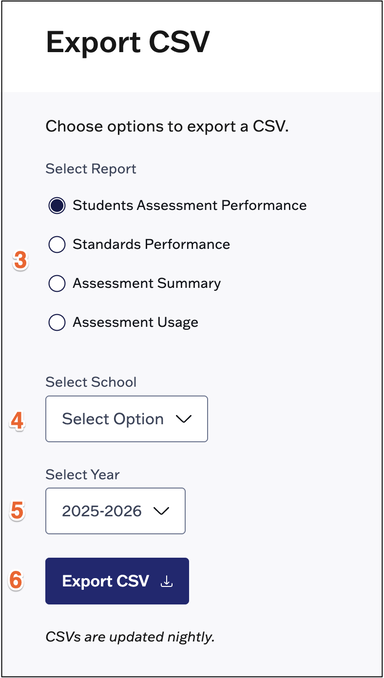
- Student Assessment Performance Report: This report calculates detailed student performance at the district and school level and provides administrators with raw data on student performance for every assessment attempt.
- Assessment Summary Report: This rollup report shows administrators how students are distributed across performance bands for any assessment.
- Standards Performance Report: This report gives administrators visibility into performance on standards.
- Assessment Usage Report: This report helps administrators answer the question: Are my teachers implementing the curriculum?
Export Data
⚠️ Reports with large datasets may exceed the row limits of spreadsheet programs like Microsoft Excel. Excel has a maximum limit of 1,048,576 rows, though the full dataset is included in the file. To view all data, you can open the file in a text editor or use alternative data tools that support larger datasets.
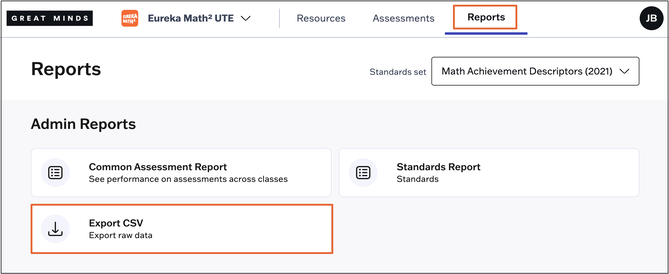
1. Select Reports from the main menu.
2. Select Export CSV from the Reports page.
3. Select the type of report you wish to generate.
4. Select a School from the drop-down (if applicable).
5. Select a Year from the drop-down (f applicable).
6. Click the Export CSV button to generate the report. The CSV file will then download to your device.
💡 Review the Administrator Reports Data Dictionary for a breakdown of the data included in each CSV report.