
There are multiple ways for educators to utilize Google Classroom in tandem with Great Minds products. Here's a breakdown of functionality we currently support.
Easy Login with Google Single Sign-On (SSO)
Students and teachers can use their existing Google login (e.g., their Gmail or Google Classroom login) to access their Great Minds account. This is a great option for schools that don’t want to manage multiple logins. Google SSO is supported with any of our supported rostering integrations: Clever, ClassLink, and OneRoster CSV.
- Learn more about Google Single Sign-On.
- Contact our support team to configure Google Single-Sign On for your district.
⚠️ Your school's IT department will need to designate Great Minds as a "Trusted" app in their Google settings. Contact our support team if you have any questions on this process.
Share Resources to Google Classroom
⚠️ To share resources to Google Classroom, an IT administrator may need to allowlist additional domains. See the Technical Specifications page for the complete safelist.
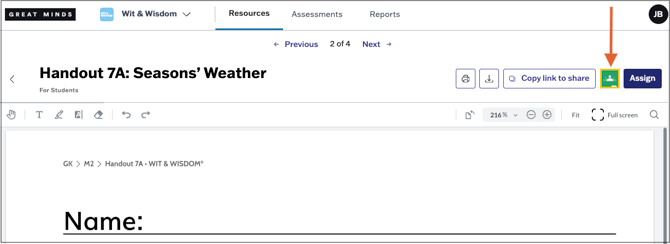
Teachers can share student resources directly to Google Classroom. See Share Resources to Google Classroom for a walkthrough of this process.
Resource Sharing Links
Alternatively, teachers can easily copy direct links to student-facing resources (e.g., assignments or videos) in Great Minds and paste these links directly into Google Classroom or any other learning management system your school uses. Learn more about sharing resources.

Other Ways We Connect
Great Minds also integrates with other popular learning management systems like Canvas and Schoology. Learn more about these integrations: