
This article outlines how to navigate and locate the curriculum materials and and resources available in Arts & Letters.
📣 The Arts & Letters digital experience has been updated for 2026-2027 based on user feedback:
- Grade 3-8 students can now submit Module Tasks and End-of-Module Assessments online. More information below.
-
Implementation Resources are now accessed from the grade-level drop-down and are linked at the top of every grade landing page. This allows teachers and leaders to access key resources in a clear, coherent way.
-
Folder names and tab labels are standardized so resources are easier to scan and locate. Subheadings added to many folders (module resources, appendices, assessment guides) to clarify what types of resources and information is included.
-
Family and writing resources are centralized. Materials that were previously scattered across grade folders or excluded from the platform altogether now live in single, dedicated locations.
-
To support navigability and backwards planning, each assessment now has its own subfolder with all materials, including stimulus texts and rubrics, pulled out for easy access.
-
Subheadings have been added to indicate which assessments can only be administered paper-pencil.
-
New front matter splits (ex: contents, Instructional Routines) and updated subheadings make it faster to find the right resource within a module.
-
Accelerated pacing guides for grades 6 through 8 are now available on the platform to support districts with shorter middle school class periods. These pacing guides provide suggestions for 45-minute lessons.
-
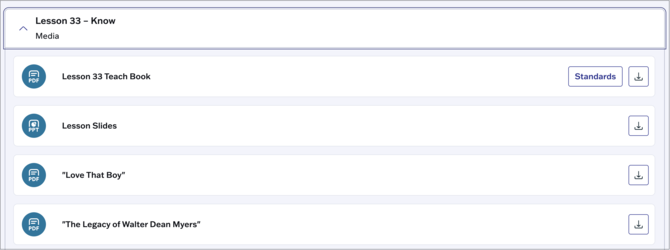
Lesson folder names now indicate the content stage or lesson type on a single line, with a media label added when a lesson includes art or video.
-
Lesson resources now include the corresponding Learn book page number or range as a subheading, so teachers can match digital resources to the print book faster.
-
Answer Supports now appear immediately after slides, ahead of other lesson resources, so teachers can find them faster during lesson prep.
-
The platform will house full PDFs for Teach, Prologue, and Learn, keeping print and digital in sync.
New and Updated Content for 2026-2027
Arts & Letters: Language Arts enhanced front matter at a glance:
|
Updated/Revised Content |
New Content |
|
Contents |
Grade at a Glance |
|
Module Summary |
Integrated Instructional Design |
|
Module Plan |
Supporting All Students |
|
Materials and Preparation |
Instructional Routines |
|
Assessments |
Unchanged: Texts, Knowledge Threads and Learning Goals, Achievement Descriptors Overview, English Language Development Standards
Arts & Letters Prologue for Language Development enhanced front matter at a glance:
|
Updated/Revised Content |
New Content |
|
Contents |
Grade at a Glance |
|
Module Plan |
Prologue Instructional Design |
|
Prologue Materials and Preparation |
Unchanged: Prologue Module Focus, Prologue Texts, Knowledge Threads, Prologue English Language Development Standards, Prologue Language Connections
Implementation Resources
Implementation resources can be accessed from the grade level drop-down or using the Implementation Resources link directly above the module tabs.
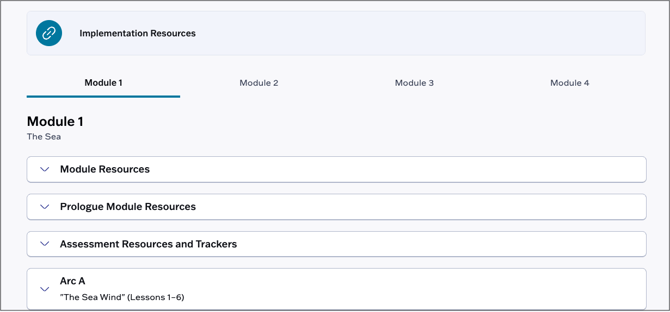
Arts & Letters implementation resources are organized into the following sections:
- The Program Overview section includes What's in the Box, Materials Lists, Module Synopses, Backwards Planning Resources, and more.
- Support Videos for getting started with the curriculum, assessment types, and more.
- Implementation resources for Teachers
- Implementation resources for Leaders and Coaches
- Prologue Implementation Guide and Materials Lists
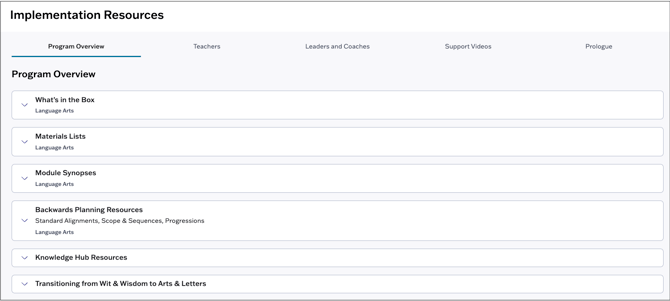
Module Resources
The Module tabs contain all materials for standard Arts & Letters instruction, including lesson PDFs, appendices, module resources, Prologue resources, and multilingual learner resources.
At the module level, you can access the following materials and resources:
- Module Resources including the Module Overview, Materials List, Instructional Routines, Accelerated Pacing Guide, Family Tip Sheets, and more.
- Prologue Module Resources
- Assessment Resources and Trackers
- Appendices
- Glossaries
NEW! Accelerated pacing guides are now available for grades 6-8 to support 45-minute periods.
NEW! Module Overviews feature new and updated content, including:
- Grade at a Glance
- Module Summary
- Module Plan
- Materials and Preparation
- Integrated Instructional Design
- Supporting All Students
- Instructional Routines
- Assessments
Each module is divided into 3-5 arcs focused on a text or text section. Within each arc, you can access individual lessons.
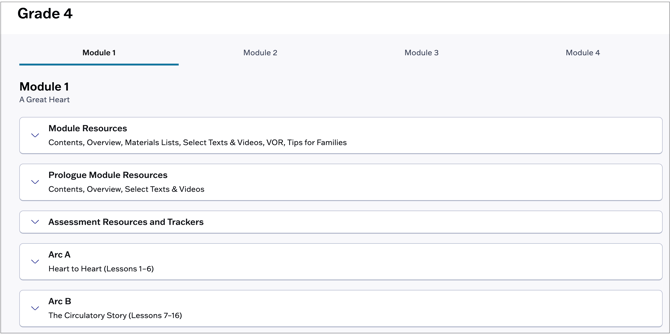
Assessment Resources and Trackers
Module-specific assessment information, such as Assessment at a Glance and Achievement Descriptors, is available at the top of this section. All assessments in the selected module have their own subfolder that includes all related materials including stimulus texts and rubrics. The sub-labels on each drop-down indicate the applicable lesson(s) as well as which assessments can only be administered paper-pencil.

Lesson Resources
Lessons are organized by arcs, with each focused on a text or text section. Each lesson includes the following materials:
- Teacher Edition PDF
- Projected Slides for the lesson
- Answer Supports
- Student Handouts
- Assessments (if applicable)
NEW! The Module Plan (accessed from Module Resources) now features updated content and clickable links for lessons, prologue lessons, and assessment guides.
Prologue lesson resources are located at point of use (prior to the lesson they support).
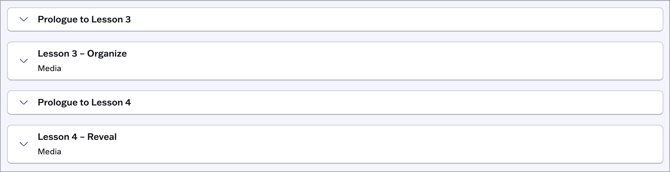
Teachers can access both PDF and Digital versions of an assessment at point of use within each lesson:
- PDF assessments are appended with the (paper and pencil) label.
- Digital assessments are appended with the (Digital) label.

New Writing Assessment Format
In grades 3-8, students can now complete Module Tasks and End-of-Module Assessments online. Teachers can score student submissions side-by-side with updated rubrics, leave criteria level feedback, and access sample responses from scoring.
⚠️ Modules 1-3 assessments are available now. The remaining modules will follow on a rolling basis through the end of September.
A new rubric format is used for all module tasks, which simplifies scoring and visibility into criteria across categories.
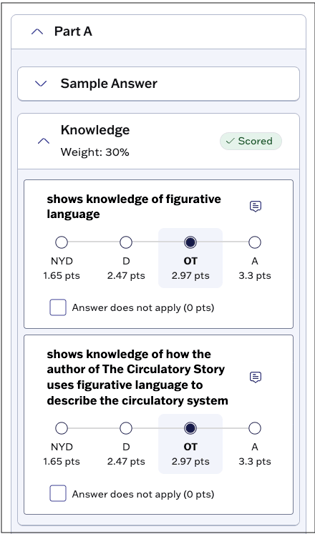
Assessment reports now show scores by criteria, group criteria by category, and provide a direct link to the Assessment Guide for Responsive Teaching. Additionally, visual assessment reports have a new green, red, and orange color scheme.


⚠️ Standards performance on Module Tasks does not flow into the student or standards reports at this time.
💡 Tips
- K-2 Module Tasks are designed for print administration. To log scores online, assign the assessment digitally (students will complete the assessment offline) and score online with the new rubrics.
- In grades 3-8, Research Log Module tasks are administered offline. These include:
- Grade 3 Module 4 Module Task 2
- Grades 4-8 Module 4 Module Task 1
- To administer any Module Task in print while retaining digital reports, assign the Module Task and follow the Complete on Paper flow to score digitally and generate an assessment report.