
September 17, 2026
- Teachers can now override the zeros awarded for skipped questions.
- The Student Status filter now shows the number of student attempts in each status.

- The Score by Student status bar is now clickable, helping teachers quickly find questions that need attention and see how much scoring remains.

- Score by Question has been redesigned so teachers can view and score every student’s response to the same question in one scrollable view. Teachers will now land on Score by Student when they open the scoring experience.
- Note: Score by Question will not be available for Equip or assessments completed offline.

August 24, 2026
- Teacher and administrator visual reports now use a green, orange, yellow and red color scheme that is easier to interpret at-a-glance.

-
The Student Monitor has been updated to provide greater visibility into student progress and attempts. Teachers can now hover over any item to view status information. See Monitor Assessments for more information.
August 17, 2026
The following updates are now available for Arts & Letters in the digital platform:
- Grades 3–8 students can now submit Module Tasks and End-of-Module Assessments online.
- Module 1 assessments are available now. Remaining modules will follow on a rolling basis through the end of September.
- All grade levels (K-8) have updated scoring and reporting in the digital platform
- Teachers can score module tasks using updated rubrics, leave criteria-level feedback, and view sample responses when scoring.
- Visual assessment reports have an updated green, red, orange color scheme (coming soon for all Great Minds curricula).
💡 See Locate Resources in Arts & Letters for more information on this update.
June 30, 2026
- PDF annotations now persist year-over-year. Annotations made in the past year remain visible to teachers in subsequent school years (as long as the district continues using the same Great Minds curriculum.)
- These updates to the assessment scoring experience are now live:
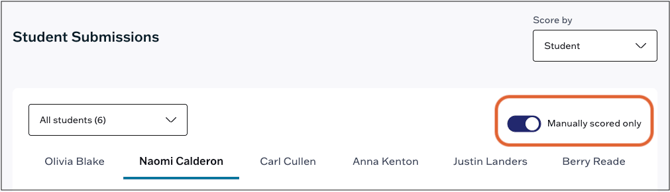
- The Manually Scored toggle in the student scoresheet collapses auto-scored questions, making it easier to identify which questions require manual scoring.
- The Student Monitor now clearly distinguishes scored and unscored attempts. Unscored attempts show a “Score” call-to-action while scored attempts display the student's score.
- The Manually Scored toggle in the student scoresheet collapses auto-scored questions, making it easier to identify which questions require manual scoring.
May 15, 2026
-
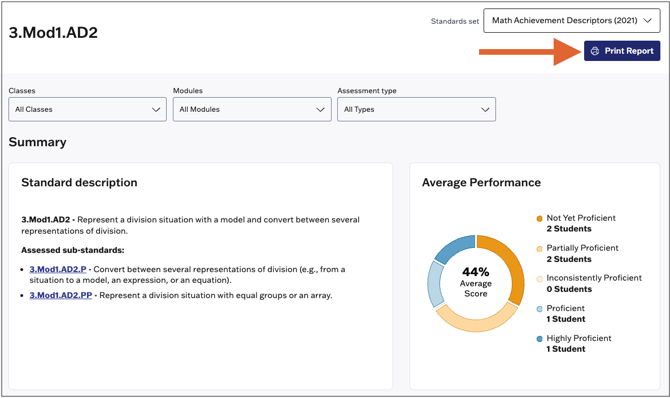
The Class Standards Report and Single Standards Report are now printable.
-
When bulk printing student submissions, total scores are now included on the printout in addition to item scores.
May 7, 2026
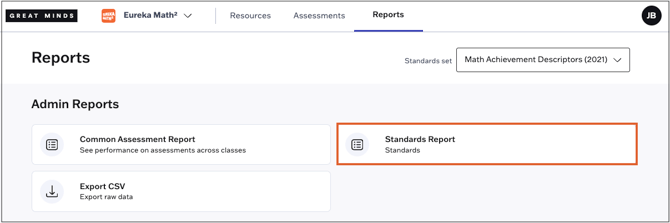
A new visual standards report is now available for school and district administrators. This report gives administrators a detailed view of student performance for all standards assessed in a school or district. See Administrator Standards Report for more information on the new report.
April 24, 2026
Teachers can now print Assessment Reports directly from the platform for annotation, data analysis, and/or data discussions with students and families.
April 13, 2026
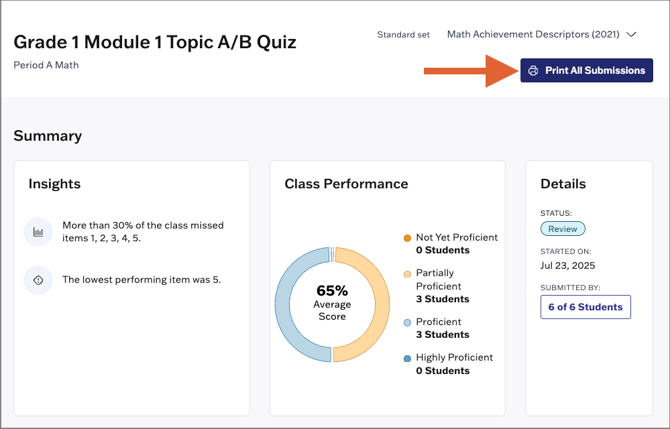
- Teachers can now bulk print student assessment submissions. This update streamlines sharing student work with families, preparing for parent-teacher conferences, or evaluating and annotating submissions offline.
April 10, 2026
-
Assessment submission printouts now include teacher feedback, giving students and families better visibility into student performance.
- A Student Counts section has been added to the Common Assessment Report that shows how many students fall into each performance band for the assessment and for assessed standards.

March 16, 2026
- Teachers can now share resources directly to Google Classroom. This feature is available for shareable PDF, PowerPoint and and video resources and is not currently available for assessments. See Share Resources to Google Classroom for more information on this feature.
-
Teachers can now print student reports in bulk, streamlining the process for generating reports for review or sharing with families. See Student Reports for more information on this update.
March 6, 2026
The following updates are now available in Assessments:
-
To access the Student Monitor, teachers will now click the assessment card on the Assigned page. The carousel that previously appeared at the top of the Assigned page has been removed.
-
In the assessment monitor, student names are now clickable which allows teachers to navigate directly to their attempt for scoring.
-
The item labels in the assessment monitor have been updated. Teachers can now see a breakdown of “Attempted” and “Not Attempted” items. The “Skipped” status has been removed.
See Monitor Assessments for more information on these updates.
February 6, 2026
The following updates are now available in Assessments:
-
Assessments in the Assigned list are now clickable and include labels that indicate the status of the assessment. For a list of labels including definitions, please see: Monitor Assessments
-
A Finish button has been adding to the student scoring page, allowing teachers to more easily close assessments once they've completed scoring.
-
Teachers can now close assessments for individual students which submits their attempt for scoring. See Close Assessments for more information.
December 16, 2025
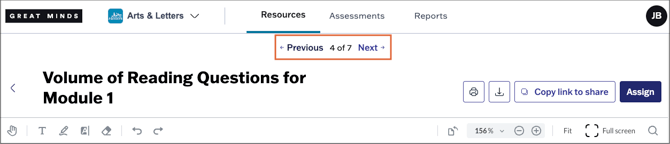
Resource pages now have Next and Previous buttons to allow for easier navigation between resources. Users can click through a category of resources in the same order they appear in the curriculum hierarchy, without navigating back to the main resource list.
December 4, 2025
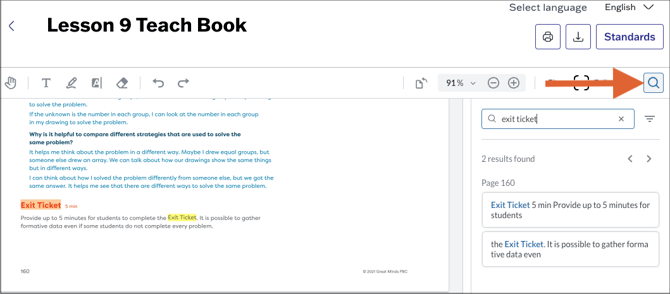
The PDF viewer now includes a search function. When viewing a PDF resource, you can select the magnifying glass icon to open the search panel and quickly locate specific terms.
November 21, 2025
The Single Standards Report is now available for teachers. This new report allows teachers to drill down to review class performance and individual student performance over time on a single standard. Learn more about the report here.November 3, 2025
From the Common Assessment Report, administrators can now drill down and focus on particular schools, teachers or classes. From the Performance sections of the report, administrators can do the following:
-
Select a school to review performance on the assessment within that school.
-
Select a teacher to review assessment performance across the teacher's classes.
-
Select a class to see all assessments administered within the class and to review the report for those assessments.
October 24, 2025
1. Teachers now have three options for launching assessments:
- Immediately provides immediate access to the assessment.
- Schedule for later allows teachers to set a specific date and time for the assessment to become available to students.
- Manually launch means teachers must manually launch the assessment from the Assigned tab.

2. For offline assessments, teachers can no longer set a start date/time since these assessments aren't visible to students.
3. Downloadable PDFs now include a Print option, allowing teachers to print directly instead of downloading the file.

October 16, 2025
- Each resource card on the Resources page now has its own Download button, so teachers can more efficiently download multiple resources without having to individually open them.

- The Standards Performance administrator CSV report has been restored.
- The confirmation message that appears after assigning an assessment now allows the teacher to return to the Assigned tab and remains visible until dismissed.

October 10, 2025
- A new Insights section has been added to the Common Assessment Report that provides an at-a-glance summary of the most frequently missed items and highest and lowest performing standards on the selected assessment.
- When creating custom assessments, teachers and administrators can now filter the item bank by language. (Note: The option to customize assessments varies by curricula and assessment type.)
October 6, 2025
The Common Assessment Report is now available for school and district administrators. The common assessment report is a visual report that contains performance data for all assessments administered within a school (for school administrators) or district (for district administrators). See Common Assessment Report for more information on the report.
October 2, 2025
- Great Minds now utilizes Microsoft's online PowerPoint previewer. The previewer supports in-platform slide animations and improves keyboard and clicker navigation. See Slide Presentation Tips and watch the below video for more information on the updated experience.
- Student names are now visible on assessment submission printouts.
September 19, 2025
- On the Resources page, we've eliminated the text truncation on the module tabs. The full text of the label is now clearly visible, allowing for easier navigation.

- In the assessment library, when previewing an assessment, the back button now returns you to the same level and assessment you left off on, so you can continue browsing without losing your place.
August 22, 2025
- Users will see improved loading times for PDF and PowerPoint resources.
- When browsing assessments in the Great Minds Library, filter selections are now persistent. If you navigate to other areas of the platform or log out of your account, your previous filter selections are still applied when you return to the Library.

August 14, 2025
We’ve improved navigation between resources. When teachers click the back button after viewing a resource, they’ll return to the same lesson with no scrolling required.

July 25, 2025
The following updates are now live on Great Minds' digital platform:
-
The icons on the Resources page now have updated designs that better indicate each resource type. See the Teacher Platform Walkthrough for a full list of all resource types and their respective icons.
-
Several updates to the assessment scoring page were released for teachers. These updates include:
-
Student names now appear as tabs across the page so teachers can easily switch between students as they are scoring.
-
Labels next to each student's name indicate if their submission has been scored.
-
Easily accessible buttons have been added to each student's scoring page with the options to Reopen, Print, or Complete on Paper.
-
Student scores now display as Points Earned/Points Possible and include percentages so scores are easily scannable.
-
